Conversations
The Inbox in Votel.ai is the command center for all your customer communications. It centralizes conversations from multiple platforms, including WhatsApp, SMS, and Email into a single, easy-to-manage workspace.
This is where your AI agents and human team members can monitor messages, reply instantly, track lead progress, and access complete customer insights all without switching between tools.

Purpose of the Inbox
The Inbox helps your team stay organized and responsive by:
- Unifying all conversations in one place.
- Allowing seamless switching between communication channels.
- Providing in-depth customer and lead insights.
- Helping manage leads across different stages of your sales or support pipeline.
Interface Overview
The Inbox is divided into three main panels:
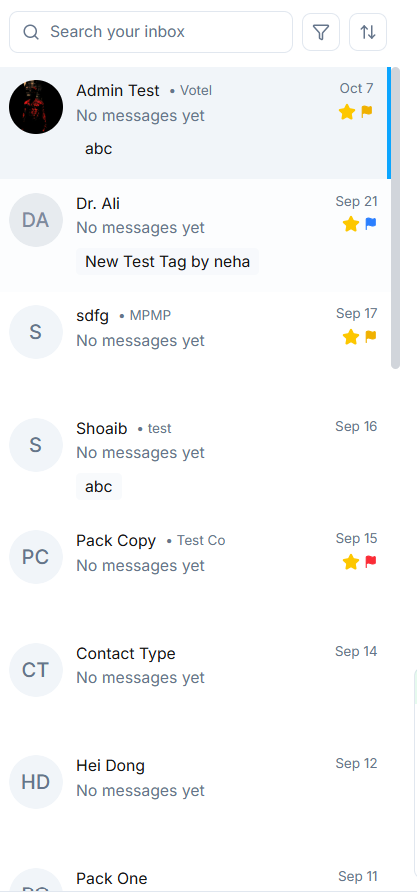
1. Conversation List (Left Panel)
- Displays all contacts and recent conversations.
- Each contact shows the name, last message snippet, and status indicator (unread, flagged, or starred).
- You can quickly search or filter conversations (see details below).
- Click on any contact to open the detailed conversation thread.
Core Functionalities
Search Bar
At the top of the Inbox, the Search Bar allows you to instantly locate messages, contacts, or leads by entering the text. :
- Name
- Company
- Phone number
Filters and Sorting
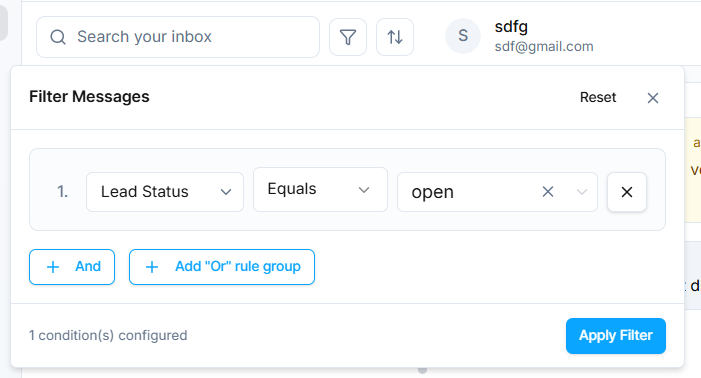
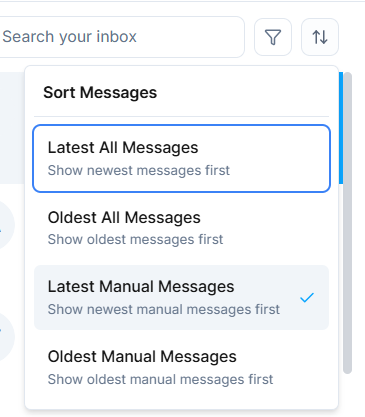
The Filter and Sort tools make managing large volumes of messages effortless:
- Apply filters like Names, Contact Details, Pipeline, Activity and many other options. You can also combine multiple filters to narrow down results, for example, search for contacts with a specific first name and company simultaneously.
- Use Sorting Options to organize your inbox by Newest, Oldest, Manual, or All.
Messaging Channels
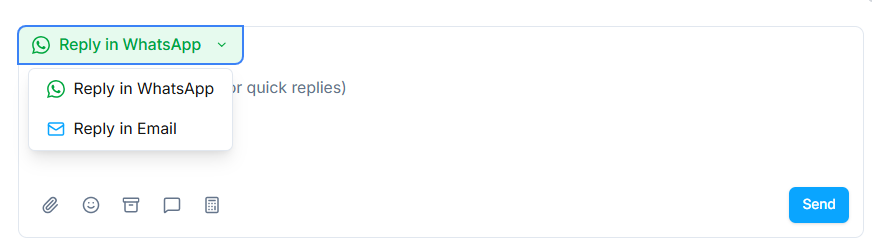
The Inbox supports multiple messaging platforms
- SMS
You can select your preferred reply channel directly in the reply box (e.g., "Reply in WhatsApp") to ensure the message is sent through the correct medium.
Pipeline Management
One of the most powerful features of the Inbox is Pipeline Control. You can manage the stage of a lead without leaving the inbox.
Each conversation can be moved between stages like:
- Review
- To Do
- In Progress
- Done
- Backlog
This makes it easy to track where each lead stands in your process, keeping communication and operations perfectly aligned.

Understanding the Pipeline Stages
Each Inbox has a visual pipeline bar across the top of the chat view, showing several progress stages by default:
-
Review
- This is the initial stage where all new messages or leads first appear.
- Use this stage to review incoming conversations and assess their intent, urgency, or qualification.
- Agents can decide whether to move them forward, assign them to a teammate, or let the AI agent continue handling them.
-
To Do
- Leads marked as To Do need further attention or manual action.
- Typically used when an agent must follow up, verify information, or schedule a task.
- It helps prioritize pending leads that are awaiting your team's input or response.
-
In Progress
- This stage represents active engagement conversations currently ongoing or deals being worked on.
- Both AI and human agents can update this status to indicate that communication is underway.
- Helps other team members instantly identify which leads are being handled and by whom.
-
Done
- Mark leads as Done once a conversation has been successfully resolved or closed.
- This could mean the customer received the help they needed, or a lead has converted into a client.
- Keeps your Inbox clean while maintaining historical records for reporting and analytics.
-
Backlog
- The Backlog stage is for low-priority or non-urgent leads that don't require immediate action.
- You can return to these leads later when resources allow, without losing their message history or context.
- Great for storing potential future opportunities or general inquiries.
Moving Leads Between Stages
- Simply click on the stage name (e.g., "Review," "In Progress," etc.) from the top of the chat and select the new stage from the dropdown.
- The update instantly reflects in your team's shared Inbox, ensuring everyone sees the same lead status.
- Pipelines can also sync with your connected CRM (e.g., HubSpot or Salesforce) through MCP integrations, keeping both systems in sync automatically.
Benefits of Pipeline Management
- Keeps your communication organized and structured.
- Ensures no lead is forgotten or duplicated.
- Gives visibility into your sales and support process directly within Inbox.
- Helps in identifying bottlenecks e.g., too many leads stuck in "Review" or "To Do."
- Enables managers to measure team productivity and agent performance efficiently.
💡 Pro Tip: Regularly review your pipeline stages to ensure conversations are correctly categorized. This helps your AI agent learn from workflow patterns and optimize automatic stage transitions in the future.
Lead Overview & Insights
On the right panel, you can access complete Lead Information at a glance:
- Contact Details: Email, phone number, and company.
- Professional Info: Department, job title, location, and reporting line.
- Lead Quality Metrics: Evaluate how qualified or valuable the lead is for your business.
- Contact Insights: View previous messages, engagement history, and other relevant notes.
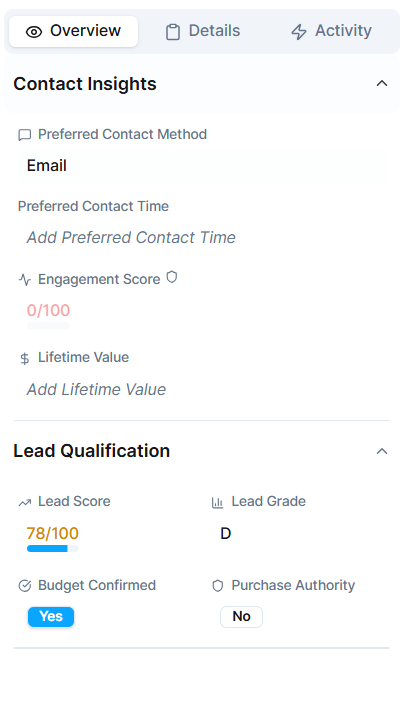
This 360° overview helps your team or AI agent communicate with precision and personalization.
Quick Replies Management
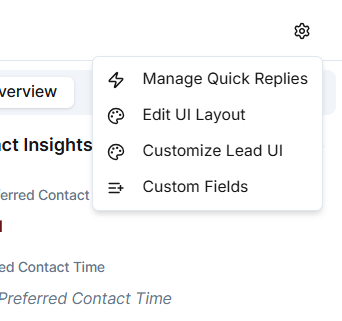
To streamline repetitive responses, you can set up Quick Replies. Click the Settings Gear Icon in the Inbox to:
- Add, edit, or delete quick replies.
- Create personalized message templates for SMS, WhatsApp, or email.
- Save time while ensuring consistency in tone and quality.
Agents can access quick replies during conversations using the "/" shortcut or by selecting from the reply box.
You can also edit Edit UI Layout, Customer Lead UI, or do customization with Custom Fields
Why the Inbox Matters
The Inbox is not just a chat interface. It's a complete communication intelligence system. It empowers your business to:
- Respond faster through multiple channels.
- Keep every lead organized and trackable.
- Access detailed insights instantly.
- Maintain consistency and professionalism in every interaction.
By bringing everything including messages, insights, and pipelines into one place, Votel.ai's Inbox ensures no conversation or opportunity ever slips through the cracks.