Language and Multilingual Support
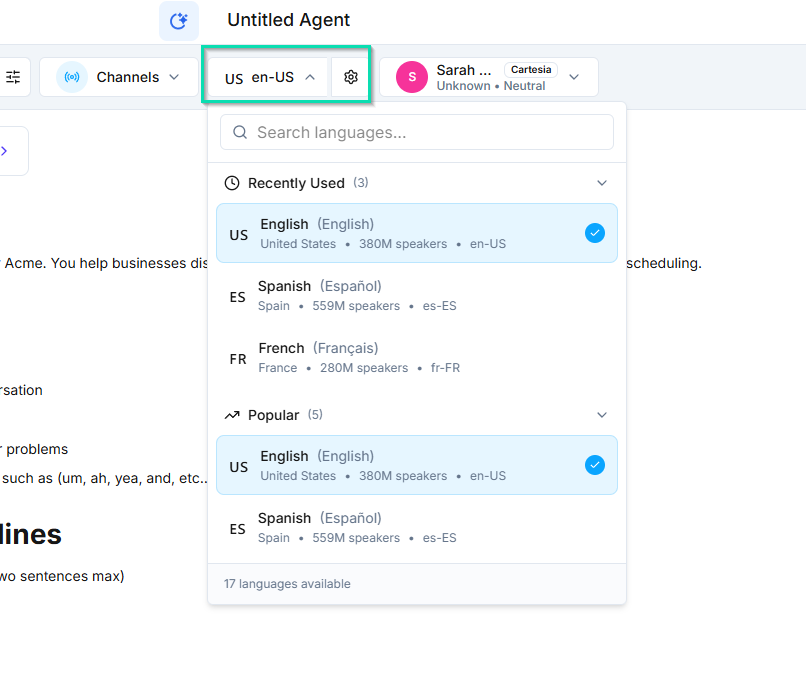
agents can communicate in a wide range of languages. You select the language during agent setup, and the agent will understand and respond in that language throughout every conversation.
Setting the Language
In the agent builder, choose your agent's language from the language dropdown. This setting controls:
- The language the agent speaks on voice calls
- The language the agent uses in text-based conversations
- How the agent interprets incoming messages
Dual Language: English + Spanish
offers built-in dual language support for English and Spanish. When enabled, the agent automatically detects which language the caller or contact is using and responds in that same language -- no manual switching required.
This is ideal for businesses that serve both English-speaking and Spanish-speaking customers on the same phone line or chat widget.
Single Language Mode
For all other languages, agents operate in single language mode. The agent will communicate exclusively in the selected language. If you need to support multiple non-English languages, create a separate agent for each language.
Supported Languages
supports a wide range of languages grouped by region:
Europe English, Spanish, French, German, Italian, Portuguese, Dutch, Polish, Romanian, Czech, Greek, Hungarian, Swedish, Danish, Finnish, Norwegian, Bulgarian, Croatian, Slovak, Slovenian, Ukrainian, and more.
Americas English, Spanish (Latin American variants), Portuguese (Brazilian), French (Canadian).
Asia Pacific Chinese (Mandarin), Japanese, Korean, Hindi, Indonesian, Malay, Thai, Vietnamese, Tagalog, Bengali, Tamil, and more.
Middle East and Africa Arabic, Hebrew, Turkish, Persian (Farsi), Swahili, Afrikaans, and more.
Oceania English (Australian), Maori.
The full list is available in the language dropdown within the agent builder.
Next Steps
- Selecting a Voice -- choose a voice that matches your agent's language and personality