Selecting a Voice
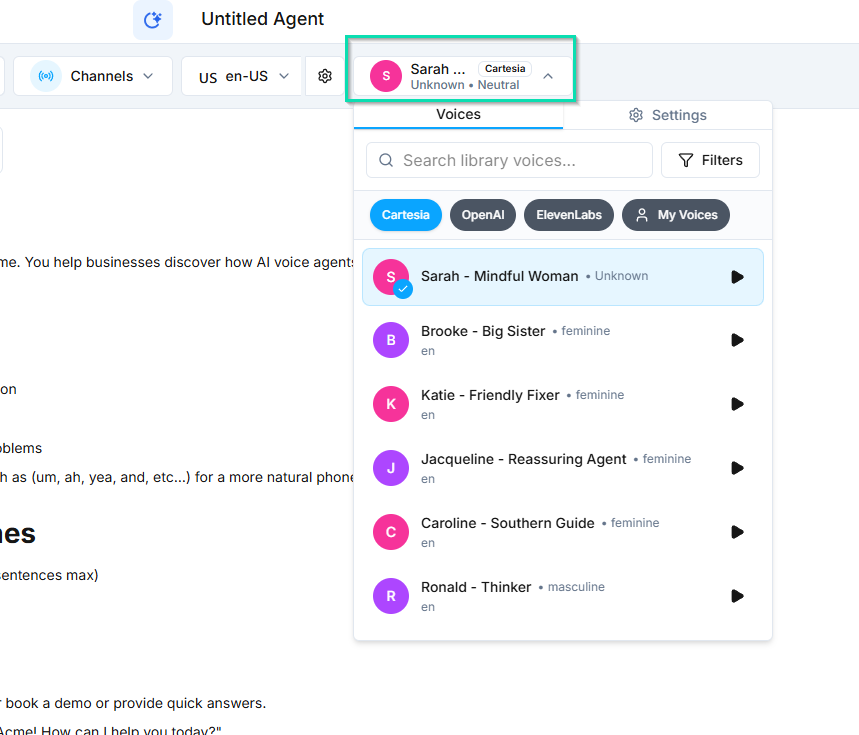
The voice you choose defines how your agent sounds during phone calls and voice interactions. integrates with three leading voice providers, each with distinct strengths. You can preview, filter, and fine-tune any voice before going live.
Voice Providers
Cartesia (Recommended)
The fastest voice provider available. Cartesia delivers low-latency, natural-sounding speech that keeps conversations feeling smooth and responsive. Recommended as the default choice for most agents.
OpenAI
Consistent and reliable voice output. OpenAI voices offer a stable, professional sound with minimal variation between calls. A solid choice when predictability matters most.
ElevenLabs
The most expressive provider with the widest variety of voices. ElevenLabs excels at conveying emotion and personality. Best for agents where a distinctive, engaging voice is a priority.
Filtering Voices
Use the built-in filters to narrow down your options:
- Accent -- select from various regional accents
- Age -- choose younger or more mature-sounding voices
- Gender -- filter by male, female, or neutral voices
Previewing Voices
Click the play button next to any voice to hear a sample. Listen to several options before making your selection. The preview gives you an accurate sense of how the voice will sound during live conversations.
Voice Settings
After selecting a voice, you can adjust the following settings to fine-tune its behavior:
| Setting | What It Controls |
|---|---|
| Speed | How fast the agent speaks. Increase for a brisker pace, decrease for a slower, more deliberate delivery. |
| Stability | Consistency of tone and pitch across sentences. Higher stability means more uniform delivery; lower stability allows more natural variation. |
| Clarity + Similarity | How natural and true-to-sample the voice sounds. Higher values produce cleaner, more faithful output. |
| Style Exaggeration | How expressive the voice is. Increase for a more animated, emotional delivery; decrease for a neutral, even tone. |
All settings come pre-optimized by default. You only need to adjust them if you want a specific effect. For most agents, the defaults work well out of the box.
Next Steps
- TTS Voices -- detailed reference for all available text-to-speech voices and provider capabilities