Quick Replies & Settings
To streamline repetitive responses, you can set up Quick Replies and customize your inbox settings.
Quick Replies Management
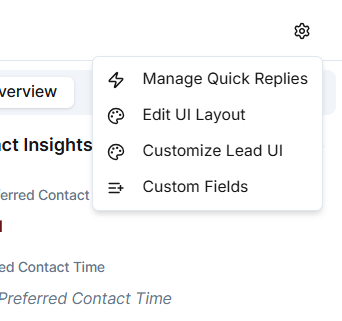
Click the Settings Gear Icon in the Inbox to:
- Add, edit, or delete quick replies.
- Create personalized message templates for SMS, WhatsApp, or email.
- Save time while ensuring consistency in tone and quality.
Agents can access quick replies during conversations using the "/" shortcut or by selecting from the reply box.
Additional Settings
You can also configure:
- Edit UI Layout - Customize the inbox interface
- Customer Lead UI - Adjust how lead information is displayed
- Custom Fields - Add custom fields to track specific information
Benefits of Quick Replies
- Save time - No need to type the same responses repeatedly
- Maintain consistency - Ensure all team members use approved messaging
- Improve quality - Pre-written, polished responses
- Faster response times - Reply instantly with pre-configured messages
- Team alignment - Everyone has access to the same templates
Quick replies are especially useful for common questions, greetings, scheduling messages, and frequently shared information.