SMS or 10DLC Brand Registration
SMS / 10DLC Business Registration: Step-by-Step Guide
Quick context: 10DLC (10-digit long code) registration is the carrier-required process in the US for businesses that send A2P (application-to-person) SMS via local long numbers. Brand + Campaign registration helps carriers know who is sending messages and for what purpose, improving deliverability and reducing spam blocking.
Top-level flow (what you'll see)
From the SMS / 10DLC tab you typically see two main actions:
- Brand Registration: register your company/brand as a legitimate sender.
- Campaign Plan: register the use case(s) and message templates you'll use under that brand.
There's also an Activity Timeline and a Registrations / Status area which shows progress and events (submitted, in review, approved, rejected, etc.).

Step 1: Company Information
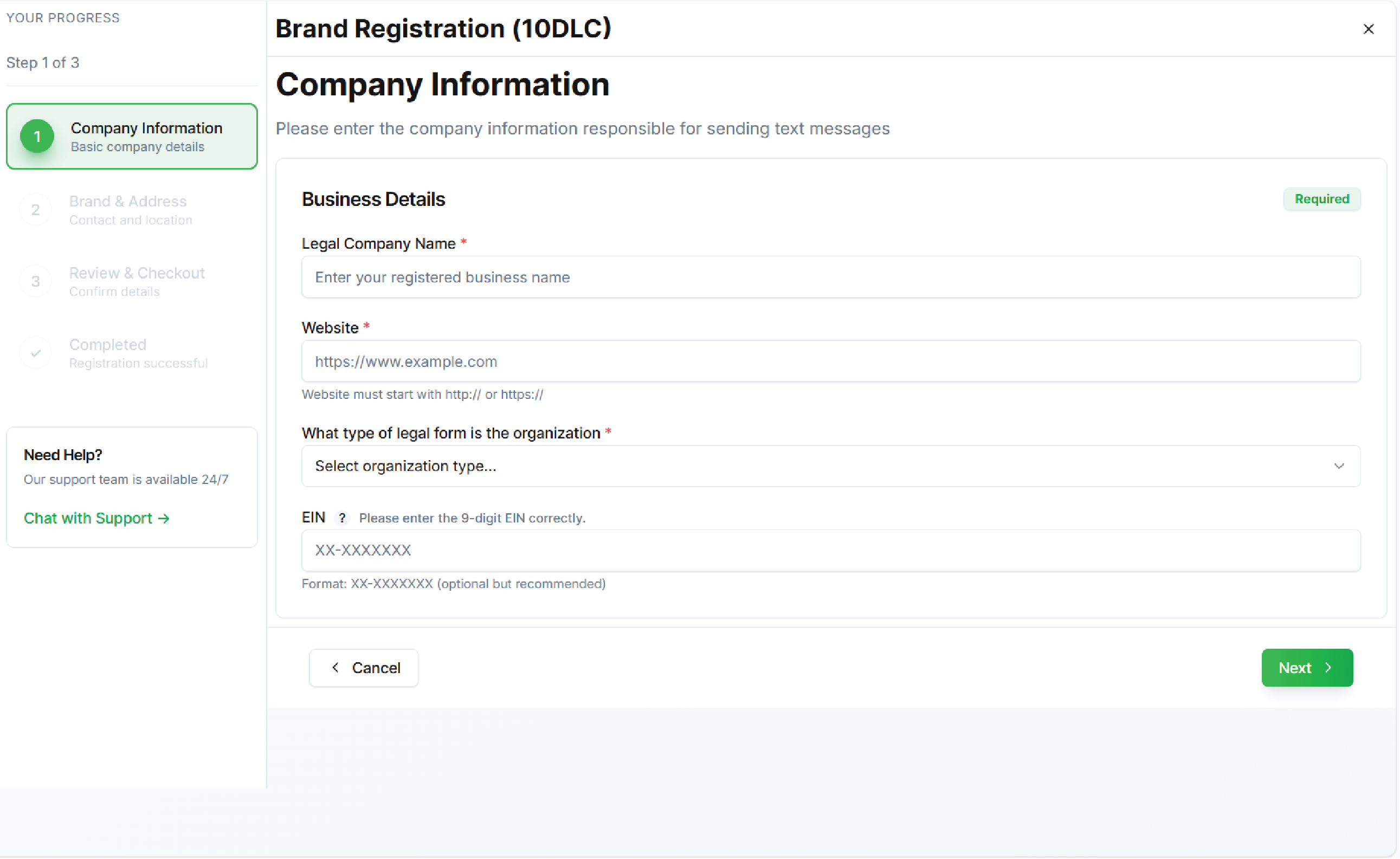
What this screen is Collects legal company data that proves the brand behind SMS messages.
Typical fields
- Legal / Registered Company Name
- Website (official domain)
- Entity type (Sole proprietor, LLC, Corporation, etc.)
- Tax ID / EIN (or national equivalent)
- Address, country, city, postal code
What Votel (and carriers) do with it
- Verify the brand identity against public databases and the domain you register.
- Use this to link campaigns and numbers to a single legal entity.
Best choices / tips
- Use your legal company name exactly as it appears on registration documents.
- Use your official company website (no free hosts). Carriers often crawl the site to verify business activity.
- Provide a valid EIN / tax ID if available, this speeds approval. If you're a sole proprietor and don't have an EIN, select correct entity type and provide any required local document.
- Make sure contact details are reachable carriers may call/email to verify.
Step 2: Brand & Contact Details
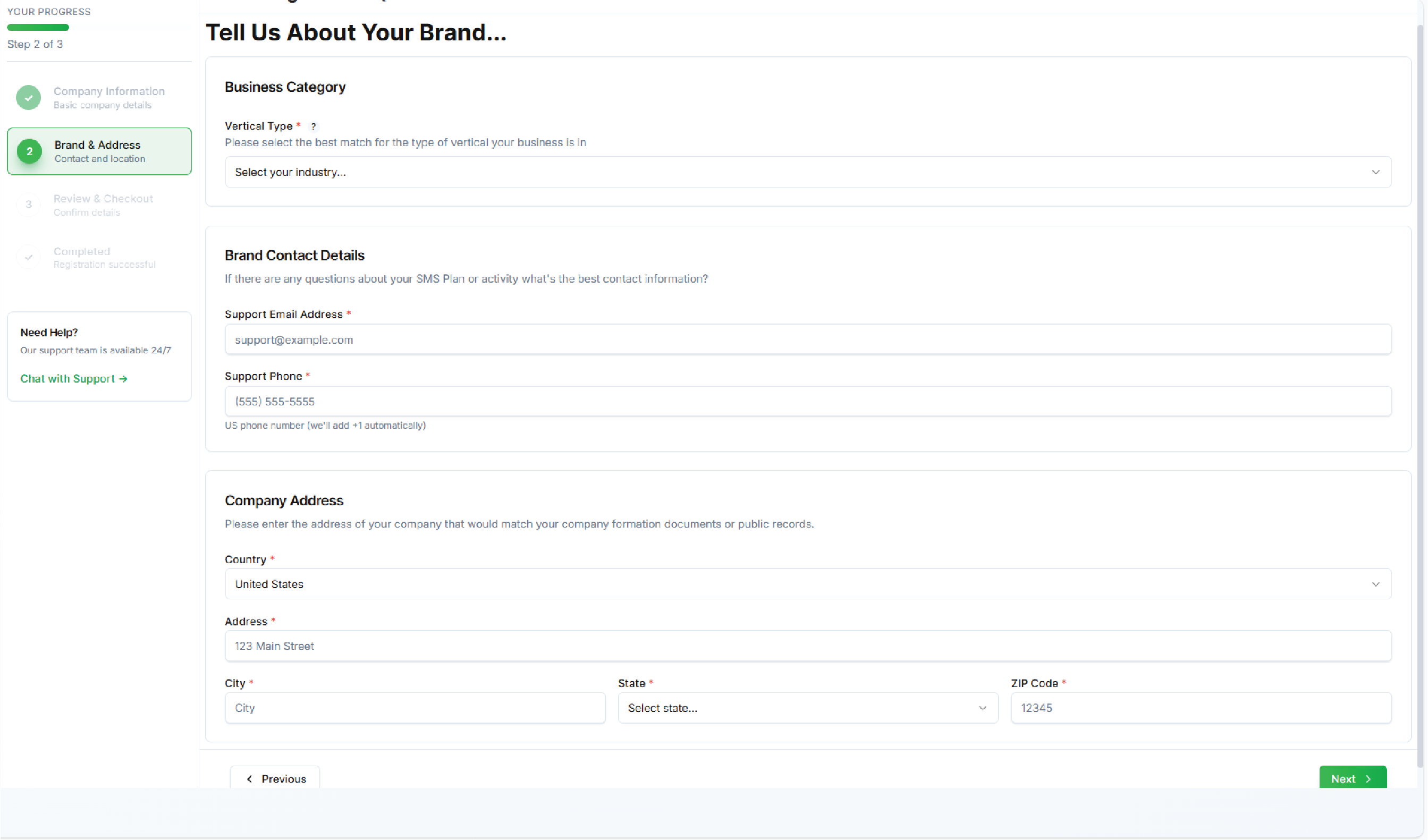
What this screen is Gathers the brand category, primary contact person, and address details used on carrier applications.
Typical fields
- Business category / vertical (e.g., healthcare, retail, financial services)
- Brand contact name, role, phone, and email
- Company address and jurisdiction details
Why it matters
- The category determines acceptable messaging types and legal/regulatory scrutiny (e.g., healthcare/financial has stricter rules).
- Contact info is used by carriers for verification and is visible on registration records.
Best choices / tips
- Choose the most accurate business category, miscategorization often leads to delays or rejection.
- Provide a direct contact (not a generic inbox). Use a business email and direct phone number where possible.
- If your brand operates multiple business lines, register the one that matches the campaign's use case.
Step 3: Supporting Documents & Verification (if shown)
What this screen is Upload any documents carriers or the aggregator require proof of incorporation, tax docs, or business license.
Why it matters
- Documents speed up verification and reduce manual follow-ups.
Best choices / tips
- Provide clear, legible scans (PDF preferred).
- Make file names descriptive (e.g., "Votel_Incorporation_2025.pdf").
- Keep a local copy in your records.
Step 4: Review & Checkout
What this screen is Final summary of the brand details, fees, and the confirmation step. Shows total registration fees (brand + campaign fees, per-campaign or per-number fees) and a submit button.
What to check carefully
- Brand name, website, entity type, and contact info, these will be used across all campaigns.
- Total registration cost and billing currency.
- Any notes on processing time or required follow-up.
Best choices / tips
- Double-check every field corrections after submission can cause delays or extra fees.
- Read any carrier notes about expected approval times. Some verticals take longer.
- Complete payment promptly to avoid auto-cancellation.
Submission / After Submission
What happens next
- The brand is submitted to the aggregator/carriers for verification. Statuses you will see: Not Registered → Pending → In Review → Approved / Rejected.
- Activity Timeline logs submission events, reviewer notes, and final status.
Typical statuses & meaning
- Pending / In Review: Under carrier/aggregator review. Expect follow-up requests.
- Approved: Brand is registered you can now register Campaigns.
- Rejected: Missed info or non-compliant documents you'll receive a reason and can resubmit after fixing.
Best choices / tips
- If rejected, fix the exact cause and resubmit don't change unrelated fields.
- Keep an eye on the activity timeline and your email for verification requests.
Campaign Plan (registering message use cases)
What this is
- A campaign is a declared use case that outlines who you will message and what kind of messages you'll send (e.g., marketing, alerts, authentication, appointment reminders). Campaigns are registered under a Brand.
Required info
- Campaign name / short description
- Use case type (e.g., Marketing, Transactional, 2FA, Customer Care)
- Sample message templates (actual content you plan to send)
- Opt-in / opt-out process description
- Destination numbers types and volumes (estimated throughput)
Why carriers need this
- To assess compliance risk, carrier routing, and whether messages will be considered A2P or spammy.
Best choices / tips
- Be explicit about opt-ins how customers opted in, where, and a sample opt-in flow. This strongly affects approvals.
- Provide realistic sample messages that reflect actual text you'll send, include opt-out text.
- Choose correct campaign type: e.g., use 2FA for authentication messages only. Mislabeling triggers rejection.
- Estimate volumes conservatively; carriers watch high throughput for spam signals.
- If you plan both marketing and transactional messages, register separate campaigns if required.
Campaign Review & Fees
What to expect
- Campaign registration often has a per-campaign fee. The Review screen shows costs and a summary before submission.
Best choices / tips
- Register campaigns that cover all message variations to avoid repeated submissions.
- Keep a copy of the submitted message templates for audit trails.
Post-submission: Activity Timeline & Monitoring
Activity Timeline
- Displays chronological events: submitted, under review, info requested, approved, etc.
- Use it to track any required next steps.
Monitoring
- Once approved, watch deliverability metrics (delivery rate, carrier responses).
- If delivery is low, check message content, opt-in processes, or complaint rates.
Registration Statuses; What they mean & actions
-
Not Registered: No brand/campaign exists. Action: Register brand and campaign.
-
Submitted / Pending: Under review; check timeline and await requests.
-
In Review: Carriers evaluating; they may request doc or message edits.
-
Approved: You may begin sending under approved campaigns and numbers.
-
Rejected: Fix issues (wrong category, bad template, missing docs) and reapply.
-
Requires More Info: Provide requested docs quickly to avoid delays.
Actions available
-
Edit / Resubmit: Update the campaign or brand.
-
Cancel / Withdraw: Stop submission if you decide not to proceed.
-
Appeal / Support: If you disagree with rejection, contact support/aggregator.
Timeline & expected wait times
-
Simple brand + campaign: often a few hours → a few days.
-
Business categories requiring manual verification: several days → weeks.
-
If carriers request extra documents, approvals pause until you respond.
Which options are best to choose, practical recommendations
-
Accuracy first: Always use exact legal names, real website, and valid TAX/EIN info. This reduces rejections.
-
Choose the right vertical: If you operate in finance/healthcare pick the relevant category and be prepared for stricter docs.
-
Message templates: Submit the actual short messages you plan to send (include opt-out). Avoid promotional language in transactional templates.
-
Opt-in proof: Describe where opt-ins happen (web form, SMS keyword). Keep records of opt-ins.
-
Numbers mapping: Register campaigns per brand and link phone numbers to that brand/campaign; don't mix unrelated products under one brand.
-
Volume & throttling: If you plan high volume, discuss rate limits with your provider/aggregator and register anticipated throughput.
-
Compliance & unsubscribe: Always include clear unsubscribe instructions and honor opt-outs immediately.
-
Prepare documents: Upload incorporation, business license, or tax docs to speed verification for regulated verticals.