Campaign Registration
Votel SMS/10DLC Campaign Plan Registration Documentation
Votel provides a streamlined, multi-step process for registering SMS campaigns in compliance with 10DLC (10-Digit Long Code) regulations. This ensures high deliverability, adherence to carrier requirements, and protection against spam filtering. The process is managed through the Votel platform and involves submitting business details, brand information, use case descriptions, user consent mechanisms, and final confirmation.
Key Benefits of 10DLC Registration via Votel:
- Compliance Assurance: Meets requirements from The Campaign Registry (TCR) and mobile carriers (e.g., AT&T, Verizon, T-Mobile).
- Improved Deliverability: Registered campaigns receive higher throughput limits (e.g., messages per second) and reduced filtering.
- Ease of Use: Votel handles submission to TCR; approvals typically take 1-5 business days, though vetting may extend to 4-6 weeks for complex cases.
- Cost Structure: One-time brand registration fee (
$4-15 USD, depending on verification) and recurring campaign fees ($2-10/month, based on use case). Exact fees are displayed during Step 5.
Prerequisites:
- A verified Votel account.
- Business legal documents (e.g., EIN/Tax ID, address proof).
- Sample messages and opt-in workflows ready.
- Public privacy policy and terms of service URLs.
Important Notes:
- All fields are mandatory unless marked optional.
- Incomplete or inaccurate submissions may lead to rejection; resubmission incurs fees.
- Opt-in proof (e.g., web forms, keywords) is critical for approval.
- For support, contact Votel at support@votel.com or via the in-app chat.
Step-by-Step Registration Process
The process consists of 5 sequential steps, progressing via "Next" buttons. You can navigate back using "Previous" if needed. Screenshots or UI previews are available in the Votel dashboard for reference.
Step 1: Create SMS Info (Business Information)
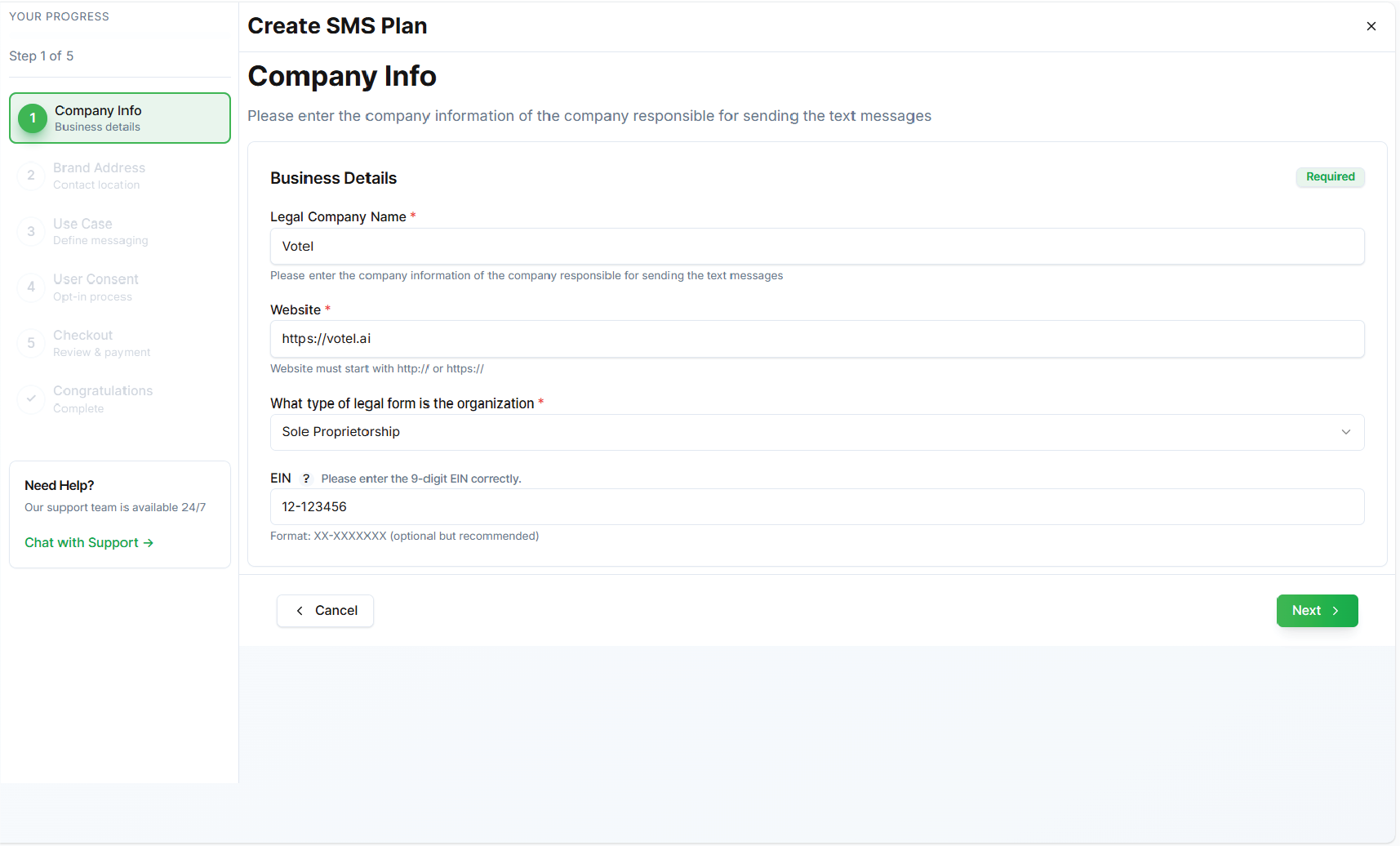
This step registers your business (brand) with TCR, establishing your entity's legitimacy. Provide accurate details to enable automated or manual vetting.
Required Fields:
| Field | Description | Example/Input Type |
|---|---|---|
| Business Name | Legal name of your company. | Acme Corp |
| Business Type | Select from dropdown (e.g., Sole Proprietor, LLC, Corporation). | LLC |
| Tax ID/EIN | US federal tax identifier (9 digits). | 12-3456789 |
| Business Address | Full street address, city, state, ZIP. | 123 Main St, Anytown, CA 90210 |
| Contact Email | Primary business email for notifications. | admin@acmecorp.com |
| Contact Phone | Business phone number. | +1-555-123-4567 |
| Website URL | Company website (must be live). | https://acmecorp.com |
| Industry | Select category (e.g., Retail, Healthcare). | Retail |
Actions:
- Review for accuracy to avoid vetting delays.
- Click Next to proceed.
Common Issues:
- Mismatched Tax ID/address leads to rejection (re-verification fee applies).
Step 2: Tell Us About Your Brand
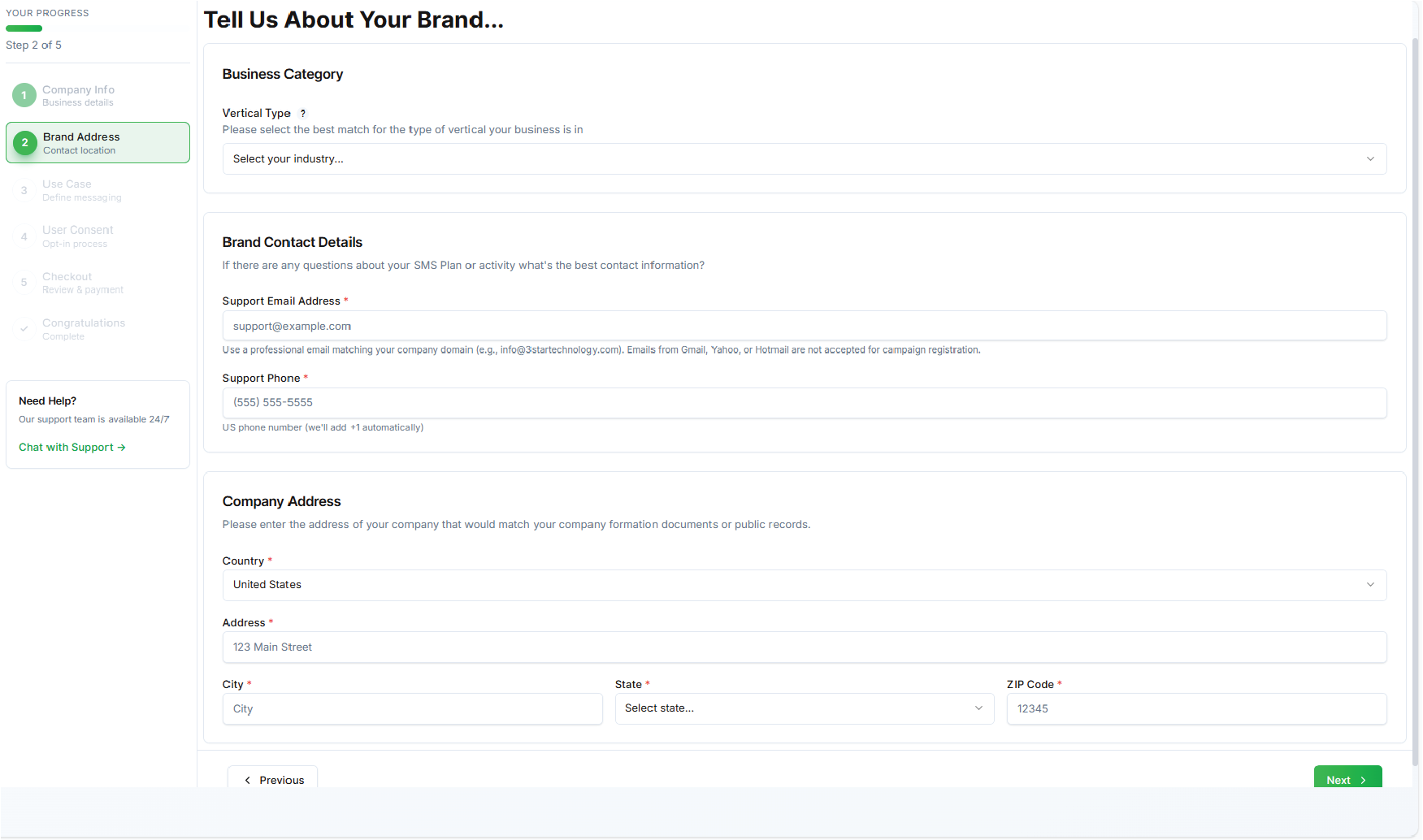
Describe your brand's messaging context. This helps TCR categorize your brand for compliance (e.g., low-risk vs. high-risk industries like finance).
Required Fields:
| Field | Description | Example/Input Type |
|---|---|---|
| Brand Name | Public-facing brand (may differ from legal name). | Acme Essentials |
| Brand Description | Brief overview of your brand and SMS purpose. | "Eco-friendly retail brand sending promotions and alerts." (Max 500 chars) |
| Support Email | Email for customer opt-out/support queries. | support@acmeessentials.com |
| Support Phone | Phone for customer inquiries. | +1-555-987-6543 |
| Company Address | Confirm/reuse from Step 1. | Auto-filled |
| Country | Select (US-focused for 10DLC). | United States |
| Opt-In URL (Optional) | Link to how users opt-in (e.g., signup page). | https://acmecorp.com/opt-in |
Actions:
- Ensure descriptions align with low-spam practices.
- Click Next to proceed.
Tip: High-risk industries (e.g., debt collection) require additional documentation; upload if prompted.
Step 3: Tell Us About Your Use Case
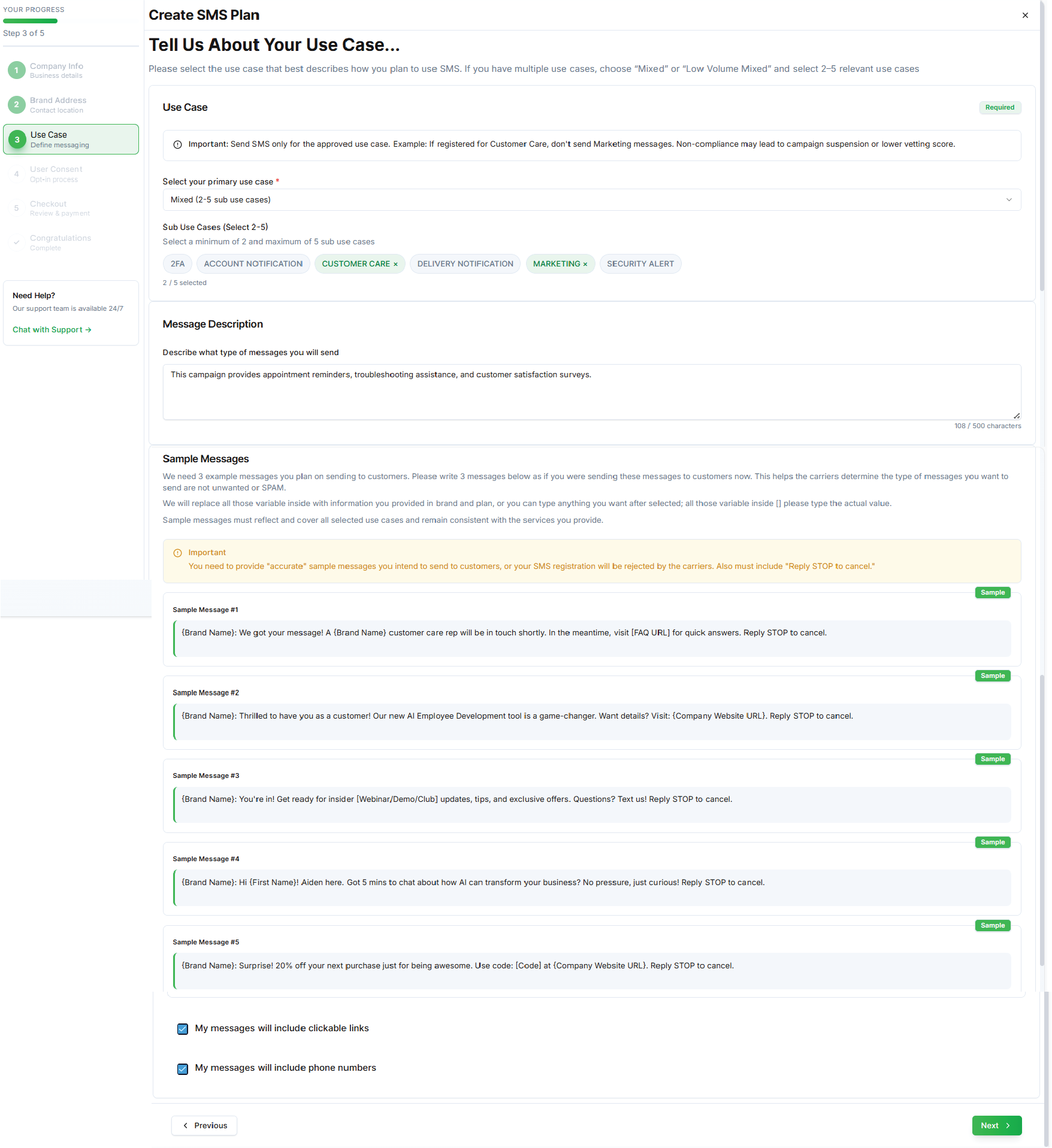
Define your SMS campaign's purpose and provide samples. This is vetted against TCR use cases (e.g., 2FA, Marketing, Notifications). Select one primary use case.
Required Fields:
| Field | Description | Example/Input Type |
|---|---|---|
| Use Case | Dropdown: e.g., Marketing, Customer Care, Mixed. | Marketing |
| Use Case Description | Detailed explanation (e.g., "Promotional offers to opted-in subscribers."). | (Max 1000 chars) |
| Message Flow Description | How messages are triggered (e.g., "Post-purchase reminders."). | (Max 1000 chars) |
| Sample Messages | 1-5 examples (min 20 chars each; include opt-out like "Reply STOP"). | "Hi John! 20% off shoes this week. Reply STOP to opt out." |
| Opt-Out Help Text | Standard opt-out instructions. | "Reply STOP to unsubscribe, HELP for assistance." |
| Links to Opt-In Proof | URLs to web forms, keywords, or signup pages. | https://acmecorp.com/signup |
Actions:
- Include unsubscribe language in all samples (TCPA compliance).
- Click Next to proceed.
Vetting Note: Carriers review for best practices; rejections often stem from vague descriptions or missing opt-outs.
Step 4: Tell About User Consent (Create SMS User Consent)
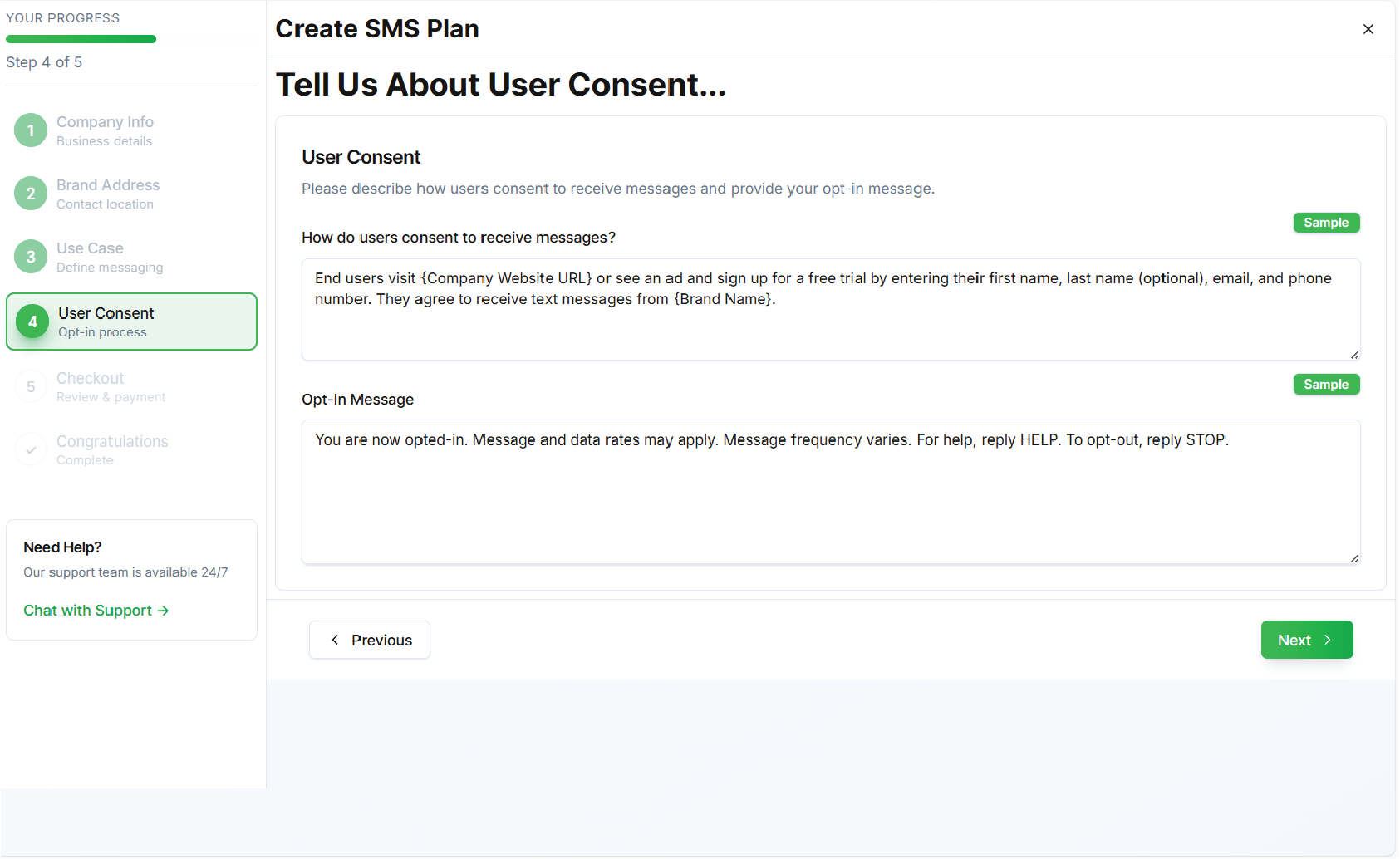
Outline how users provide explicit consent. This is crucial for TCPA compliance and carrier approval.
Required Fields:
| Field | Description | Example/Input Type |
|---|---|---|
| Opt-In Method | Describe collection (e.g., "Double opt-in via web form."). | Checkbox on signup with SMS consent. |
| How Users Opt-In | Step-by-step (e.g., "Users check box: 'I agree to SMS updates'."). | (Max 500 chars) |
| Company Website Login | URL for user portal (if applicable). | https://acmecorp.com/login |
| Opt-In Message | Pre-consent text (e.g., "Reply YES to receive offers."). | "Text YES to 555-1234 to opt-in." |
| Links to Privacy Policy/Terms | Public URLs explaining data use and opt-out. | Privacy: https://acmecorp.com/privacy Terms: https://acmecorp.com/terms |
Actions:
- Upload screenshots of opt-in flows if requested.
- Click Next to proceed.
Compliance Tip: Consent must be affirmative and revocable; retain records for 5+ years.
Step 5: SMS Plan Confirmation
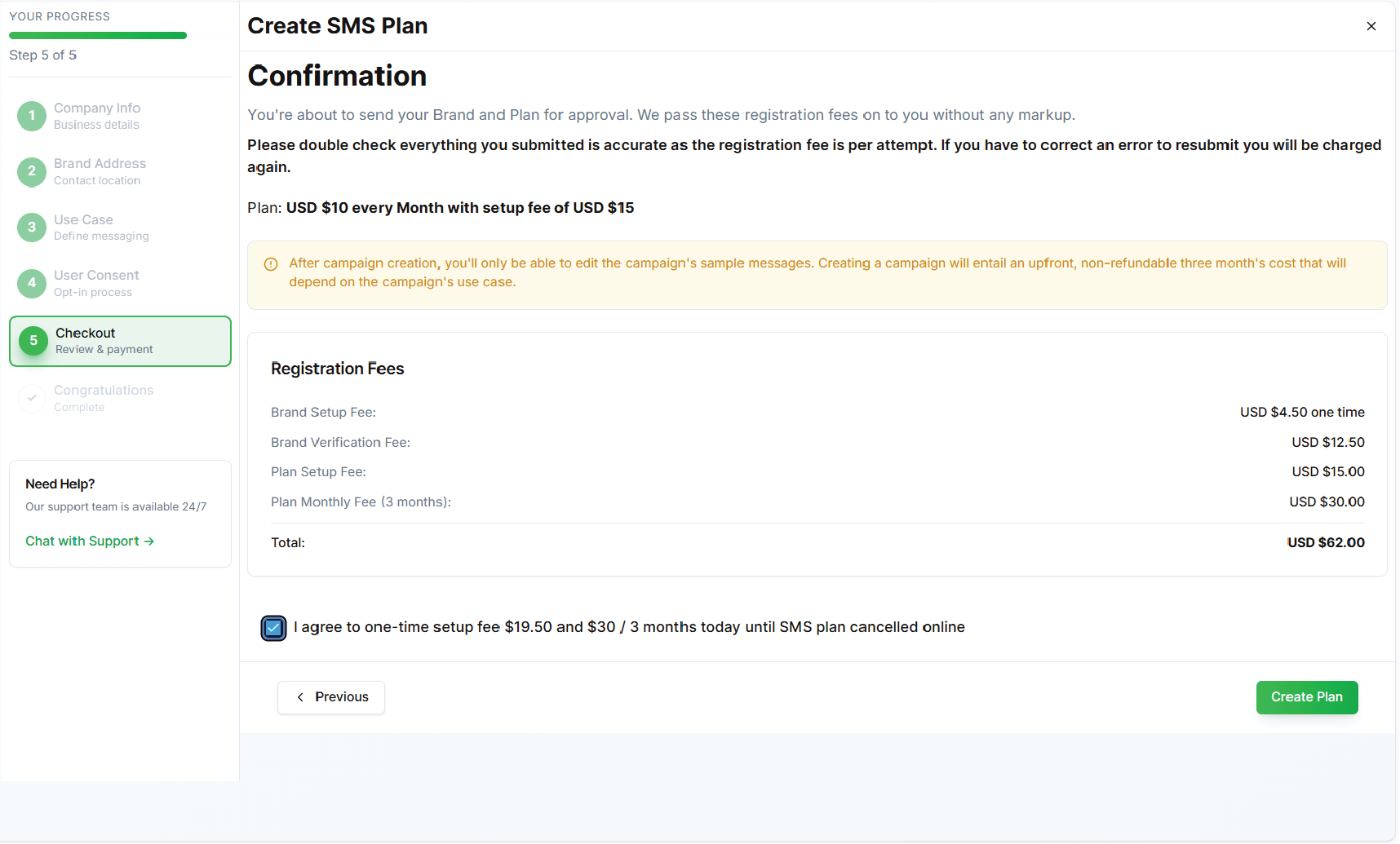
Review and confirm details. Agree to fees and terms before submission.
Required Fields/Actions:
| Section | Description | Details |
|---|---|---|
| Summary Review | All prior steps' data displayed for edit. | Verify business, brand, use case, consent. |
| Registration Fees | One-time brand fee + monthly campaign fee. | e.g., Brand: $4 USD Campaign: $2/month (Low-Volume Marketing) |
| Terms Agreement | Checkbox: "I confirm accuracy and agree to TCR terms." | Required. |
| Setup Time | Estimated activation: 1-5 days post-approval. | Displayed. |
Actions:
- Click Check Out to pay and submit.
- Receive confirmation email with tracking ID.
Post-Submission:
- Status tracked in Votel dashboard.
- Upon approval, associate 10DLC numbers via Votel console.
- Test messages before full rollout.
Approval and Post-Registration
- Timeline: Brand: Instant/manual (1-3 days); Campaign: 1-5 days; Full vetting: Up to 6 weeks.
- Rejection Handling: Common reasons include incomplete opt-ins or mismatched info. Resubmit via Votel support (fee applies).
- Throughput: Starts at 1 MPS/number; request increases post-approval.
- Best Practices:
- Use double opt-in.
- Honor STOP/HELP immediately.
- Monitor deliverability metrics in Votel analytics.
- Resources:
- TCR Guidelines: campaignregistry.com
For questions, reach out to Votel support.