Overview
The Phone section in Votel allows you to manage your business communication infrastructure, from purchasing new numbers to assigning them, enabling features like SMS or HD Voice, configuring caller IDs, and routing calls directly to agents or external destinations. This feature gives your business the flexibility to connect with customers seamlessly across multiple communication channels while maintaining full control over usage and configuration.
My Numbers
The My Numbers tab is your complete dashboard for managing every number linked to your Votel account. Here, you can view the list of all purchased or assigned numbers and get detailed insights at a glance.
The table includes the following columns:
-
Number – Displays your purchased or active number.
- Location (Country) – The country or region where your number is registered.
- Assigned To – The user or sub-account responsible for managing this number.
- Features – Shows available capabilities for the number, such as Voice, SMS, or MMS.
- SMS Status – Indicates whether the SMS functionality is Enabled or Disabled.
-
Usage of Today – Displays your real-time call or message usage for the current day.

Editing a Phone Number
To configure or modify any number, click on the Edit icon next to the specific entry. This will open the Edit Phone Number Settings panel, allowing you to customize several aspects of your number:

1. Number Information
This section displays your registered number and its integration source. It helps you confirm the number's identity before making changes.
2. Assigned To
Select an Admin User or Sub-Account to assign management rights for this number. The assigned user will have permissions to handle inbound/outbound calls, view call logs, and manage related workflows.
3. HD Voice
Toggle this option to Enable or Disable high-definition voice quality. HD Voice ensures clearer, crisper conversations — especially beneficial for professional or customer support environments.
4. Caller ID Name (CNAM)
You can set a Caller ID Name that appears on the recipient's device when you make a call. This helps enhance brand trust and recognition.
-
For US Numbers: Votel (via Telnyx) submits your CNAM to major national CNAM databases.
-
For Canadian Numbers: The CNAM is embedded directly into the INVITE's From and PAID headers for caller visibility.
5. Call Destination
This setting determines where incoming calls to this number will be routed. You have two options:
-
Agent – Select one of your AI agents to automatically handle calls, respond to queries, or transfer conversations using Votel's conversational intelligence.
-
Phone Number – Forward the incoming calls directly to another external phone number of your choice.
This routing system ensures flexibility in call management — whether you want AI automation or human follow-up.
Buy Number
The Buy Number tab allows you to purchase new numbers for your organization, with advanced search and filtering tools to find exactly what you need.
Search & Filter Options
You can apply multiple filters and search parameters, including:
-
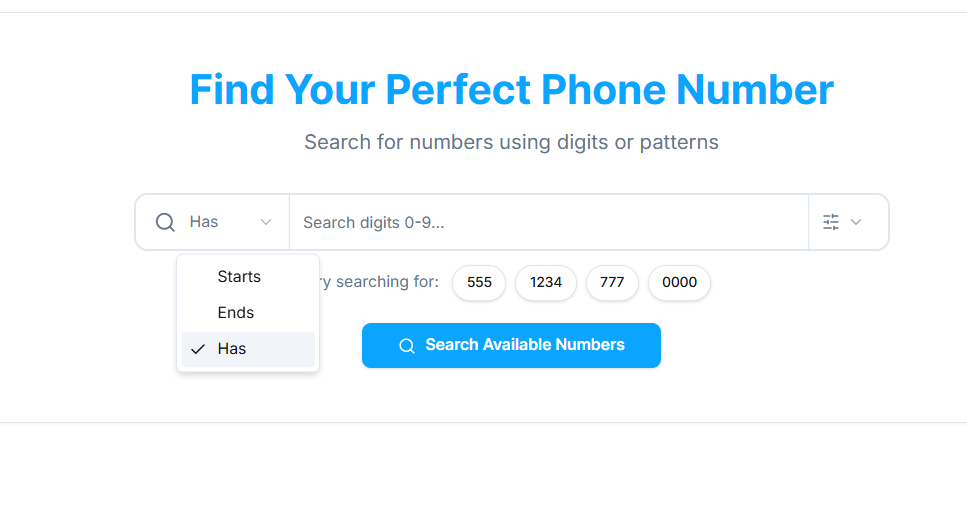
Number Pattern Search
- Start With – Find numbers that begin with specific digits.
- End With – Find numbers that end with specific digits.
- Has – Search numbers containing specific patterns or sequences.
- Start With – Find numbers that begin with specific digits.
-
Integration Filter Choose an integration source from existing options like Votel TelnyxVotel or Votel, or connect new integrations to bring numbers from other platforms.
-
Country Narrow down your search based on your preferred country or region for compliance or local presence.
-
Features Filter available numbers by the capabilities they support, such as:
- SMS: Send and receive text messages.
- Voice: Enable inbound and outbound calling.
- MMS : Send and receive multimedia messages.
- Emergency: Support for emergency calling.
- Fax: Compatibility for fax transmission.
- Local Calling: Restricted to local networks.
- International SMS: Allows messaging across international carriers.
- HD Voice: Enhanced audio quality for voice calls.
-
Type Choose between:
- All – Display all available numbers.
- Local – Numbers for specific regions or cities.
- Toll-Free – Ideal for customer service or support lines.
-
Area Filters
- Area Code, City, or State/Province – Narrow down your search to a specific region.
- Area Codes List – Select one or multiple area codes to refine your results further.
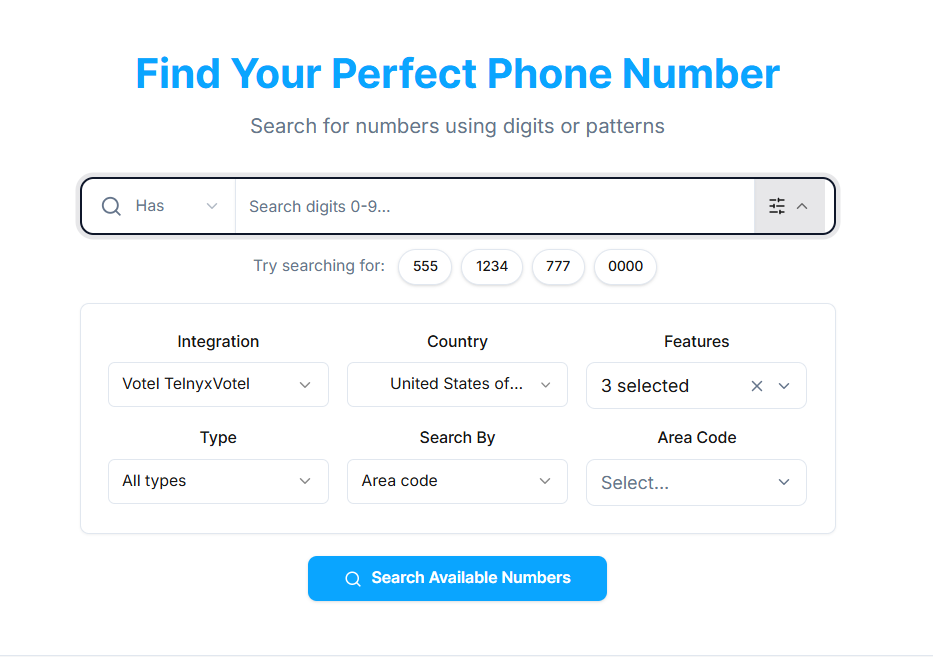
Once you apply your desired filters, click Search to view all available numbers matching your criteria.
Buying a Number
After search results appear, you'll see a list of numbers with their features and pricing. Review the details, and click Buy Now to purchase and add the number to your account. Once purchased, the number will automatically appear in your My Numbers list, ready for configuration.
Why This Matters
Having control over your phone numbers within Votel means.
- Centralized communication across voice, SMS, and MMS.
- The ability to route calls directly to AI agents for automated handling.
- Improved branding through Caller ID customization.
- Greater reach and flexibility with local and toll-free options.
- Full compliance and visibility into daily usage and call destinations.
This section gives businesses complete control over their phone communication ecosystem — ensuring every customer call, message, or conversation is managed efficiently under one platform.