Execute Workflow Node
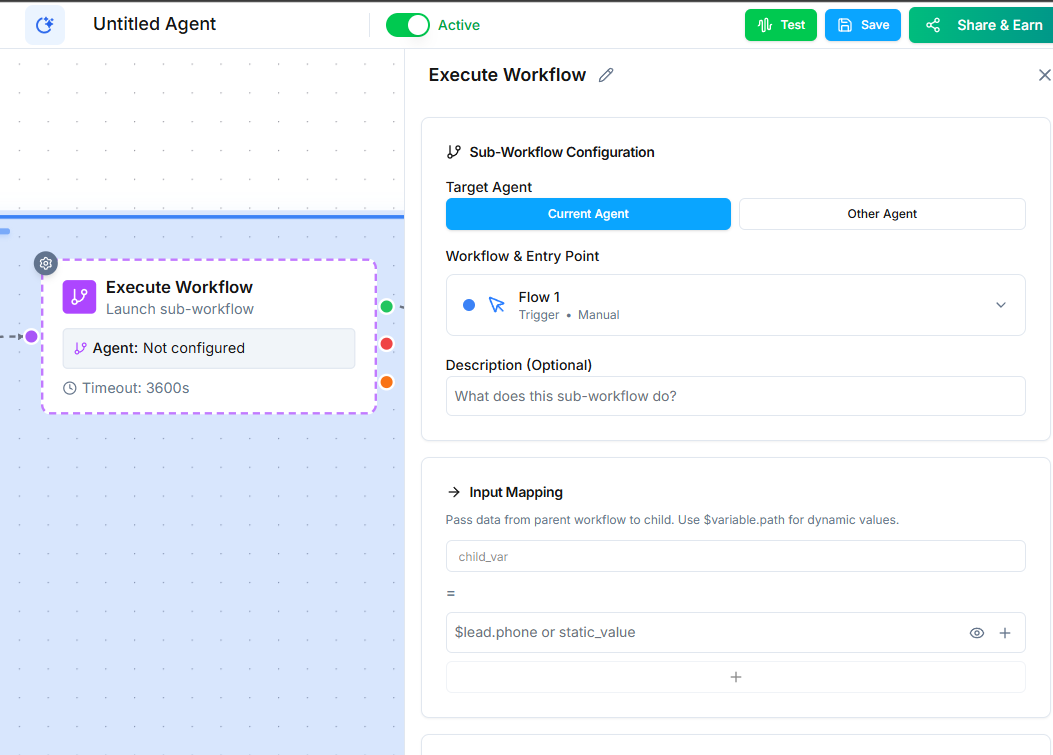
The Execute Workflow node calls another workflow from within the current one. Use it to build reusable logic that multiple agents or workflows can share.
Video Walkthrough
How It Works
When the workflow reaches this node, it triggers the specified child workflow for the same contact. The child workflow runs as its own process, executing its own nodes and logic.
Configuration
Select the target workflow from the dropdown. The list shows all workflows in your account that have a When Executed by Another Workflow trigger.
Why Use Execute Workflow
As your automation grows, you will find common sequences that multiple workflows need. Instead of duplicating those sequences in every workflow, build them once and call them with the Execute Workflow node.
Examples of Reusable Workflows
- Qualification sequence --- A standard set of qualifying questions that multiple agents use.
- Data enrichment --- A workflow that looks up and updates contact information from external sources.
- Notification routine --- A sequence that notifies the right team members based on contact type.
- Post-call wrap-up --- A standard follow-up process (send email, create task, update pipeline) used after any sales call.
Execute Workflow vs. Go To
| Execute Workflow | Go To | |
|---|---|---|
| Scope | Calls a separate workflow | Jumps within the same workflow |
| Reusability | Shared across multiple workflows | Only within the current workflow |
| Best for | Common processes used by many agents | Loops and skips within a single flow |
Tips
- Make sure the target workflow has the When Executed by Another Workflow trigger, or it will not run.
- Keep reusable workflows focused on one task. A workflow that does too many things is harder to maintain and debug.
- Name your reusable workflows clearly (e.g., "Shared: Lead Qualification" or "Shared: Post-Call Follow-Up") so they are easy to find.
Next Steps
- Go To Node --- jump to another point within the same workflow