SMS Notification Node
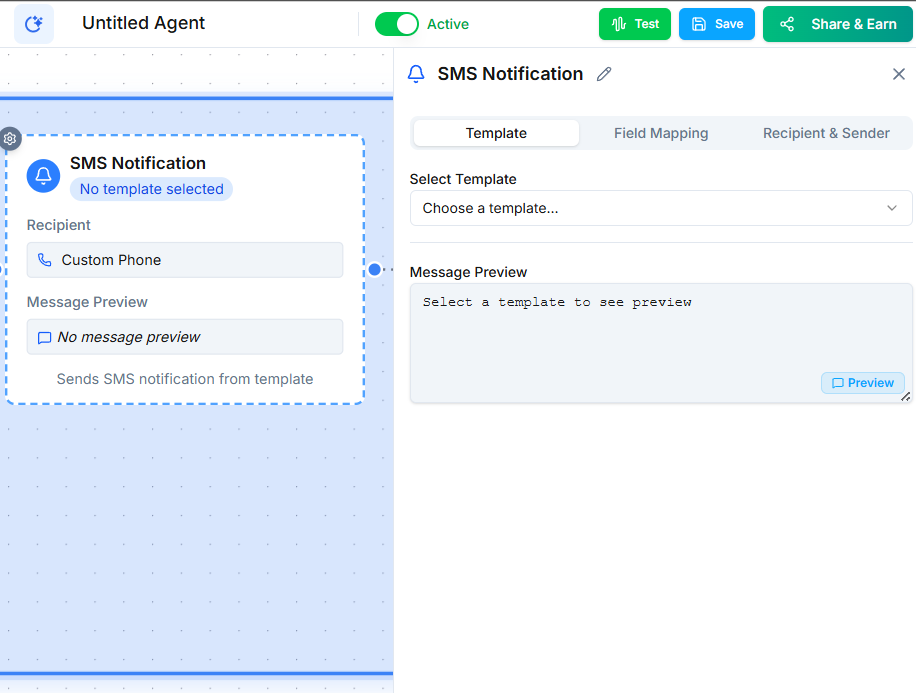
The SMS Notification node sends a quick text message to a contact without requiring 10DLC registration. It is designed for Day-1 use --- immediate notifications and confirmations you need to send before your 10DLC application is approved.
Video Walkthrough
How It Works
When the workflow reaches this node, it sends a single SMS message to the contact's phone number. The message is sent as a notification, not as part of a marketing campaign.
When to Use SMS Notification vs. SMS Node
| SMS Notification Node | SMS Node | |
|---|---|---|
| 10DLC required | No | Yes |
| Best for | Quick one-off notifications | Ongoing messaging and campaigns |
| Use case | Appointment confirmations, immediate follow-ups | Marketing, drip sequences, bulk outreach |
Common Use Cases
- Appointment confirmations --- Send a quick text confirming a booking made during the call.
- Immediate follow-ups --- Text a link or summary right after a conversation ends.
- Internal alerts --- Notify a team member's phone about an important call.
- Getting started fast --- Send messages on your first day while your 10DLC registration is still processing.
Limitations
This node is intended for transactional, one-off notifications. It is not suitable for:
- Marketing campaigns
- Bulk messaging
- Drip sequences
- Any use case that requires high-volume sending
Once your 10DLC registration is approved, use the full SMS Node for these scenarios.
Next Steps
- SMS Node --- send SMS messages with full 10DLC compliance
- 10DLC Registration --- register your numbers for high-volume messaging