Outbound Call Node
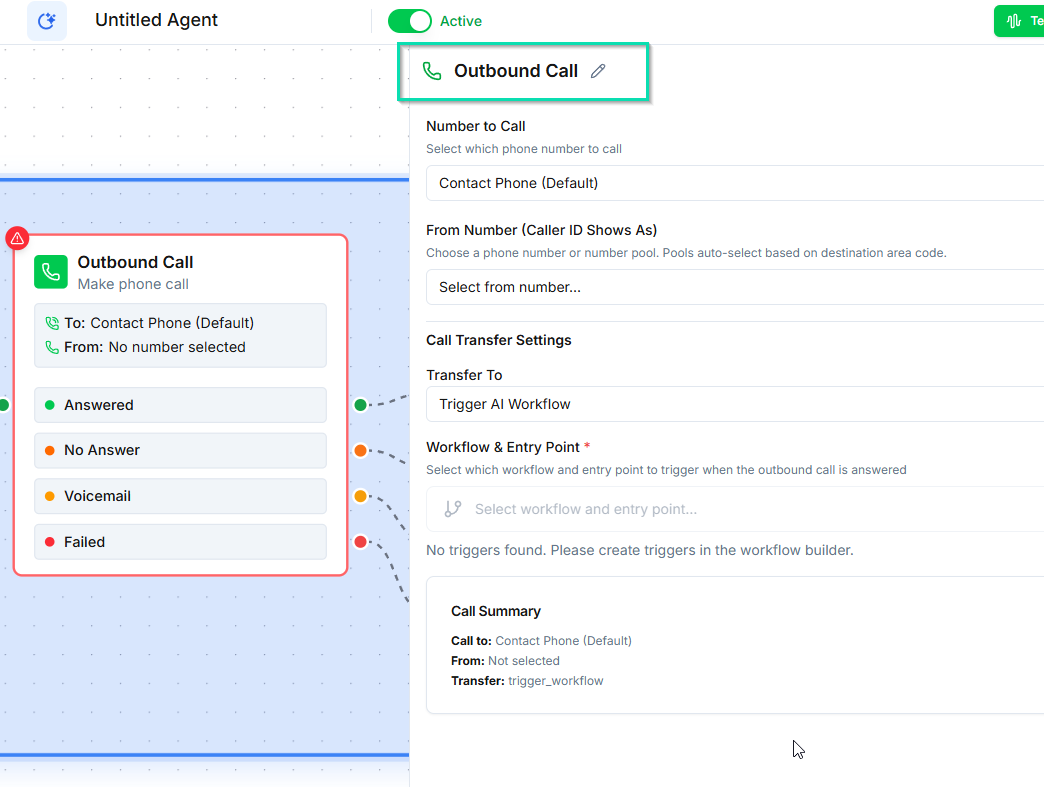
The Outbound Call node initiates a phone call to a contact from within a workflow. It is the core building block for outbound campaigns, automated follow-ups, and proactive outreach.
How It Works
When the workflow reaches this node, places a call to the contact's phone number. You configure the caller ID and the workflow handles the rest based on the call outcome.
Caller ID Selection
Choose which phone number appears on the contact's caller ID:
- Specific number --- select one of your registered numbers.
- Number pool --- rotate through a set of numbers to improve answer rates and avoid spam flagging.
Outcome Branches
The Outbound Call node has four outcome branches, each leading to a different workflow path:
| Branch | When It Fires |
|---|---|
| Answer | The contact picks up the call |
| No Answer | The call rings but is not answered |
| Voicemail | A voicemail system is detected |
| Failed | The call could not connect (invalid number, carrier issue, etc.) |
Each branch can lead to different actions. For example, on No Answer you might wait and retry, while on Voicemail you might send a follow-up SMS.
The Two-Workflow Pattern
Outbound campaigns typically use two workflows working together:
-
Outreach Workflow --- Uses a Manual Trigger and the Outbound Call node. This workflow handles the mechanics of placing calls, managing retries, and spacing out attempts.
-
Conversation Workflow --- Uses a Conversation Started trigger. When a contact answers the outbound call, this workflow handles the actual conversation with the AI agent.
This separation keeps your outreach logic (timing, retries, fallbacks) separate from your conversation logic (what the agent says and does).
Tips
- Use the Wait node before retry attempts to space out calls and avoid overwhelming contacts.
- Connect the Voicemail branch to an SMS node to send a text when the contact does not answer.
- Monitor answer rates and adjust your number pool or call timing accordingly.
Next Steps
- Wait for Time Node --- add delays between call attempts
- Building Outbound Campaigns --- end-to-end guide for setting up campaigns