Set Pipeline Node
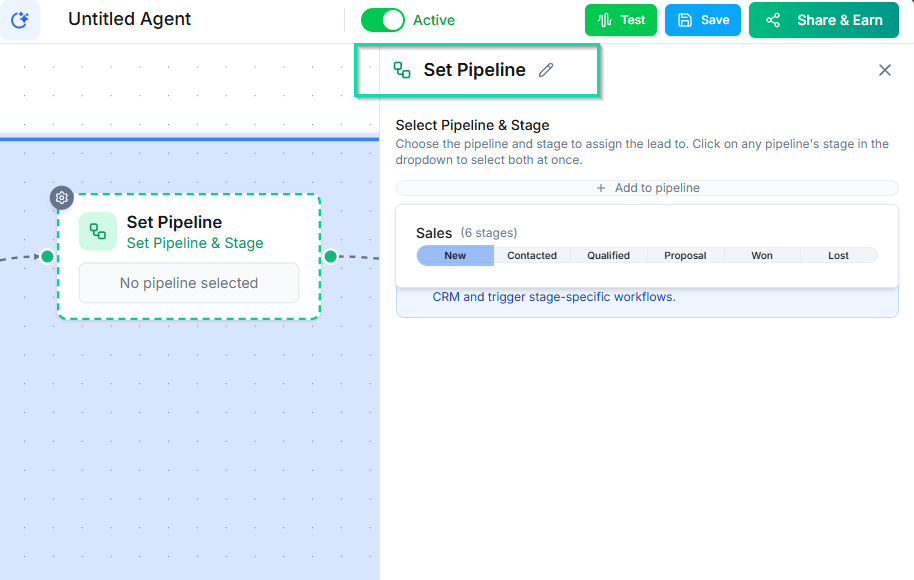
The Set Pipeline node moves a contact to a specific stage in one of your pipelines. Use it to automatically categorize and advance contacts based on workflow outcomes.
Video Walkthrough
How It Works
When the workflow reaches this node, it places the contact into the specified pipeline and stage. If the contact is already in that pipeline, they are moved to the new stage. If they are not in the pipeline yet, they are added.
Configuration
- Select a pipeline --- choose from your existing pipelines (e.g., Sales Pipeline, Onboarding Pipeline).
- Select a stage --- choose the specific column/stage within that pipeline (e.g., "Qualified," "Proposal Sent," "Won").
Why Pipelines Over Tags
Pipelines provide structured categorization that tags cannot offer:
- Visual tracking --- see all contacts in each stage on a Kanban board.
- Progression --- contacts move through defined stages, giving you a clear picture of where everyone stands.
- Reporting --- pipeline data supports conversion tracking and stage-by-stage analytics.
- Drag and drop --- team members can manually move contacts between stages on the board.
Common Use Cases
- Post-qualification --- After a qualifying call, move the contact to "Qualified" in your sales pipeline.
- Appointment booked --- Move contacts to "Appointment Set" when a booking is confirmed.
- Follow-up needed --- Place contacts in a "Needs Follow-Up" stage after an inconclusive conversation.
- Deal closed --- Move contacts to "Won" or "Lost" based on the outcome.
Tips
- Create your pipelines and stages before building workflows that reference them.
- Use the Pipeline Column Change trigger on other workflows to automate actions when contacts move between stages.
- Combine with the Tag Lead node if you need both structured stages and quick flags.
Next Steps
- Tag Lead Node --- add simple labels to contacts
- Pipelines --- set up and manage your pipelines