Contact Lookup Node
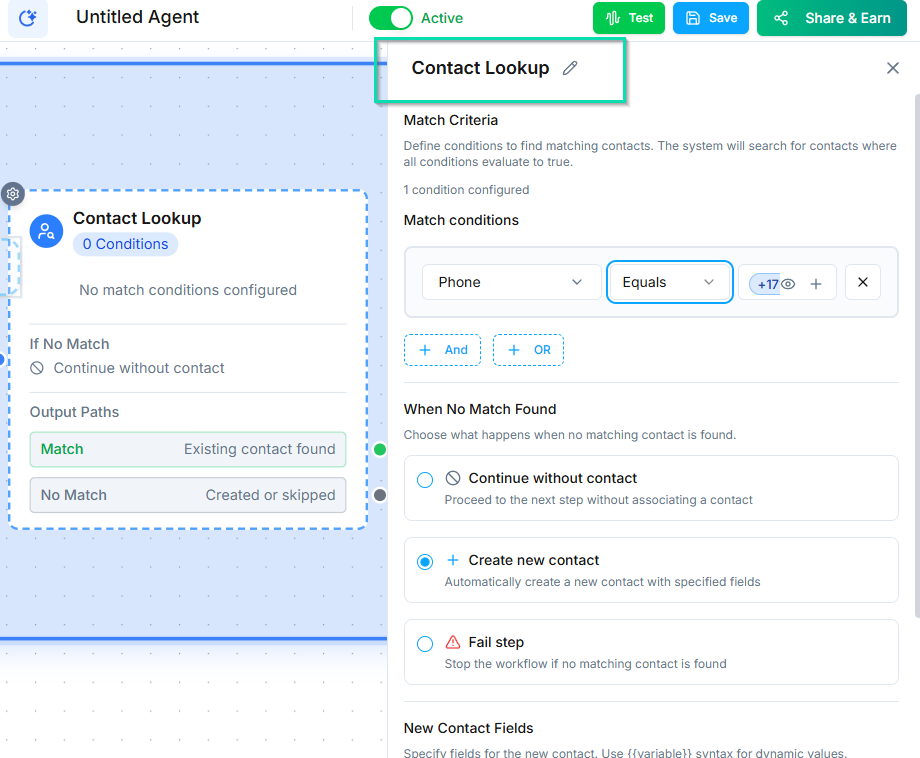
The Contact Lookup node searches your contact database for an existing record matching specific criteria. Use it to identify returning callers, check for duplicates, or route known contacts differently from new ones.
How It Works
When the workflow reaches this node, it queries your contacts by a field you specify --- phone number, email, or any custom field. The result determines which branch the workflow follows.
Output Branches
The Contact Lookup node has two branches:
| Branch | When It Fires |
|---|---|
| Match | An existing contact was found matching your criteria |
| No Match | No contact in your database matches the criteria |
Each branch leads to a separate workflow path, letting you handle known and unknown contacts differently.
Lookup Fields
You can search by:
- Phone number --- the most common option for inbound calls.
- Email address --- useful for email or web-based workflows.
- Custom fields --- search by account number, member ID, or any other field you have created.
Chaining Multiple Lookups
If a single lookup is not enough, you can chain multiple Contact Lookup nodes in sequence. For example:
- First, search by phone number.
- If no match, ask for their email and search by email.
- If still no match, create a new contact.
This gives you multiple chances to identify an existing contact before creating a duplicate.
Common Use Cases
- Returning caller recognition --- Greet known contacts by name and skip the intake process.
- VIP routing --- Look up the contact, check their status, and route VIPs to a priority queue.
- Duplicate prevention --- Before creating a new contact, check if one already exists.
Next Steps
- Deduplication --- strategies for preventing duplicate contacts
- Ask and Save Node --- collect information when a contact is not found